FAQ
Who validates the validator, huh?
We wrote a comprehensive suite of tests using the pytest python framework and a custom setup. This tests, among many others, the following:
Empty files and geometries, invalid input file formats. However, val3dity does not validate the schema of the input.
All the error cases listed in Errors.
Various valid geometries and boundary conditions.
Command-line user input.
You can read more about the details, or check the complete list of tested geometries
How to interpret the report?
With the option --report a JSON report is output.
The report lists the errors at two levels:
errors with the input files (errors 9xx)
all other errors, per feature (eg for each Building the list of errors is given)
The report contains several properties, one example:
{
  "type": "val3dity_report",
  "time": "2024-05-21T12:16:50 (CEST)",
  "input_file": "/home/elvis/myfile.city.json",
  "input_file_type": "CityJSON",
  "val3dity_version": "2.5.0",
  "validity": false,
  "parameters": {
    "overlap_tol": -1.0,
    "planarity_d2p_tol": 0.01,
    "planarity_n_tol": 20.0,
    "snap_tol": 0.001
  },
  "all_errors": [102, 104, 203, 601],
  "dataset_errors": [],
  "features_overview": [
    {
      "total": 644,
      "type": "Building",
      "valid": 324
    },
    {
      "total": 1,
      "type": "TINRelief",
      "valid": 1
    }
  ],
  "primitives_overview": [
    {
      "total": 1490,
      "type": "Solid",
      "valid": 1305
    },
    {
      "total": 1,
      "type": "CompositeSurface",
      "valid": 1
    }
  ],
  "features": []
}
The property "validity" is used to report whether the file is 100% valid, or not.
If it’s invalid, then "all_errors" lists all the error codes present in the input file (the list is empty if the file is valid).
"dataset_errors" lists all the errors related to the input file (errors 9xx).
"features_overview" gives you an overview of the features in the file, in this case there were 644 Buildings and 1 TINRelief.
"primitives_overview" gives you, similarly, an overview of the geometric primitives.
The "features" property list all the features in the file, and for each the errors are reported, if any.
An example is as follows:
{
  "features": [
    {
      "id": "GUID_0048B9B9-8028-4C01-9D55-6D96F0AB3A15",
      "type": "Building",
      "validity": true,
      "errors": []
    },
    {
      "id": "GUID_00D36CED-764E-4631-B88C-EA98528BA782",
      "type": "Building",
      "validity": false,
      "errors": [
        {
          "code": 203,
          "description": "NON_PLANAR_POLYGON_DISTANCE_PLANE",
          "id": "coid=GUID_00D36CED-764E-4631-B88C-EA98528BA782_1|geom=0|shell=0|face=4",
          "info": "distance to fitted plane: 0.0122035 (tolerance=0.01)"
        }
      ]
    },
    {
      "id": "GUID_00723D18-2A2C-47B4-ACF3-F5B6F4EC7224",
      "type": "Building",
      "validity": true,
      "errors": [],
    },
    {
      "id": "GUID_032A685A-1262-4157-A797-C9ED49A65725",
      "type": "Building",
      "validity": false
      "errors": [
        {
          "code": 601,
          "description": "BUILDINGPARTS_OVERLAP",
          "id": "coid=GUID_032A685A-1262-4157-A797-C9ED49A65725_1|geom=0&&coid=GUID_032A685A-1262-4157-A797-C9ED49A65725_2|geom=0",
          "info": "geometries are lod=2",
          "type": "Error"
        }
      ],
    },
  ]
}
For each primitive, its identifier is ("id") is given, its "type", and its "validity".
The "errors" property is always listed, and it is an array of the errors; it is an empty array if the feature is valid.
Because a feature (eg a Building) can contain several geometries and children (eg the BuildingPart of a Building), we report the error by giving extra information about its location.
coid= tells you the City Object identifier.
geom=0 tells you that it’s the first geometry in the list of geometries (if CityJSON is used), and similarly solid=1 would indicate the second solid in a MultiSolid, shell=1 would indicate that the 2nd shell in the Solid has an issue, and face=13 would mean the 14th surface listed in the primitive has an issue.
A 0-based system is used for reporting.
You can navigate this report with a JSON browser (eg drag it into an empty window in Firefox) or by loading it to the val3dity report browser:
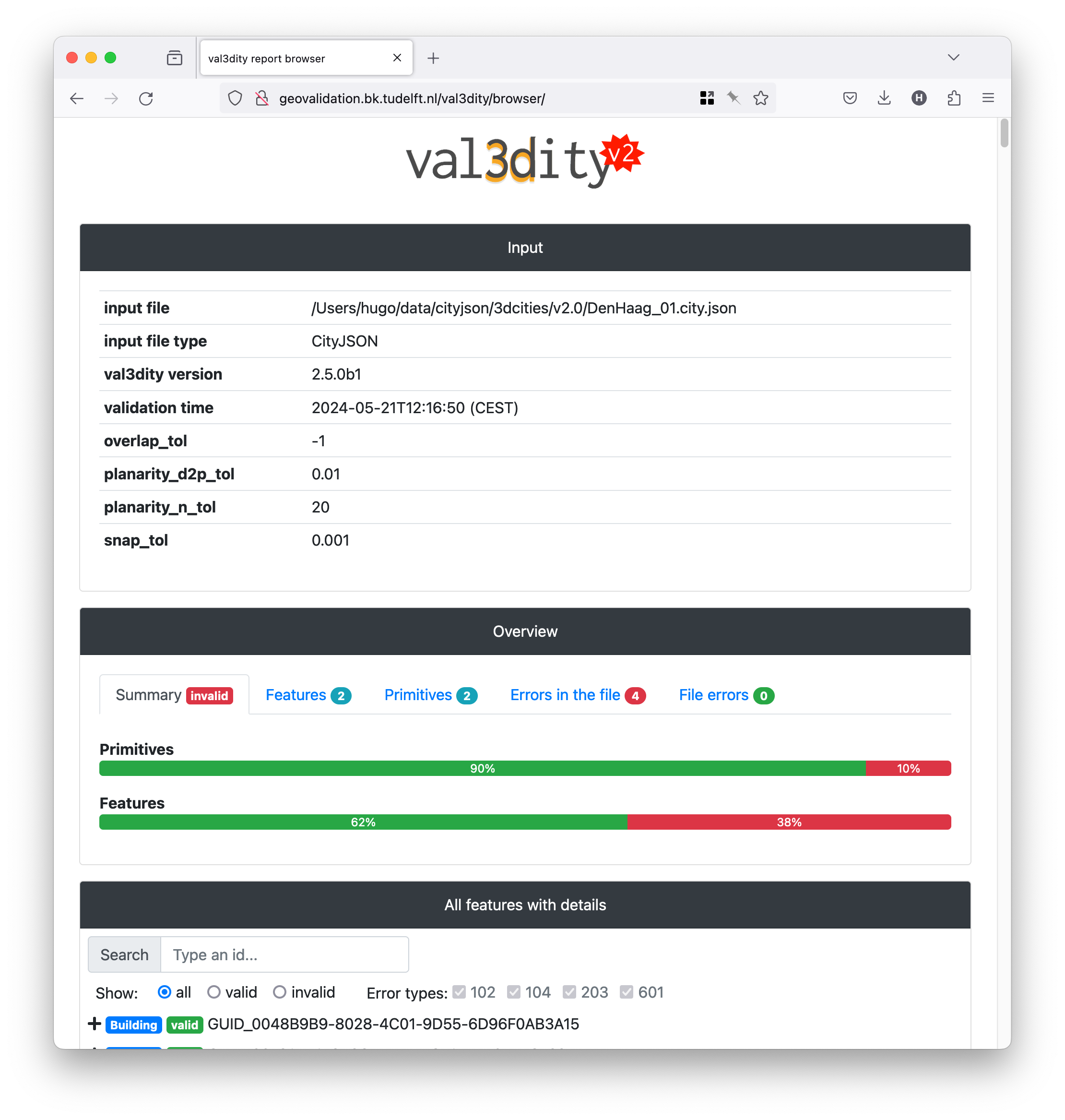
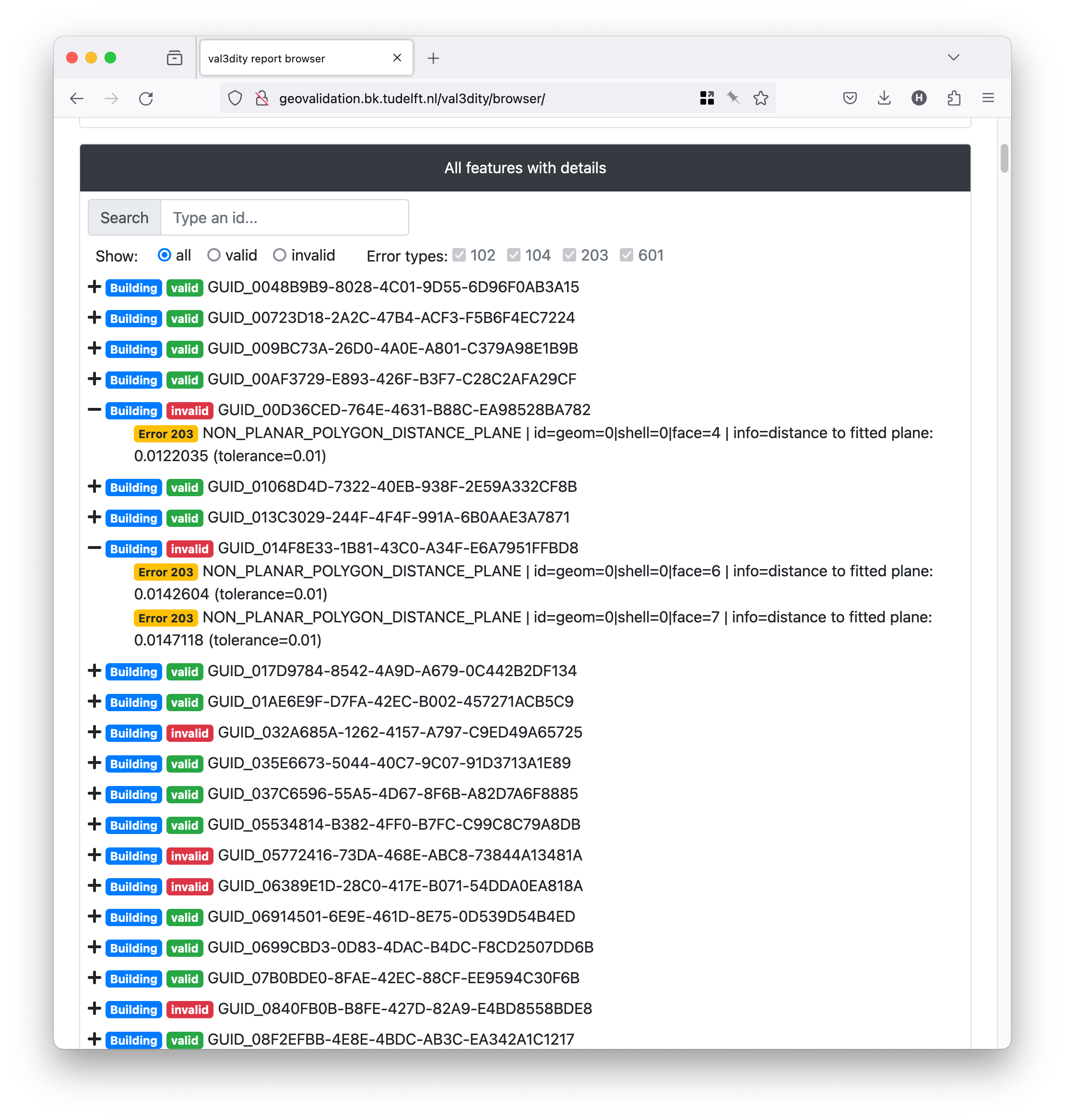
There you get an overview of the statistics per features and primitives, and each feature has its errors as children.
I get many errors 203 and 204, but my planes look planar to me. Why is that?
This is a very common error, actually 203 – NON_PLANAR_POLYGON_DISTANCE_PLANE is the most common error for all the files so far uploaded to our web application.
Read carefully the explanations of the errors 203 – NON_PLANAR_POLYGON_DISTANCE_PLANE and 204 – NON_PLANAR_POLYGON_NORMALS_DEVIATION.
A surface is first check for error 203, if valid then error 204 is checked. By definition, if an error 204 is reported then all the vertices are within 1cm (tolerance you used), thus you wouldn’t be able to visualise them. That usually means that you have vertices that are very close (say 0.1mm) and thus it’s easy to get a large deviation (say 80degree; the report contains the deviation).
I don’t see all the errors in my solid
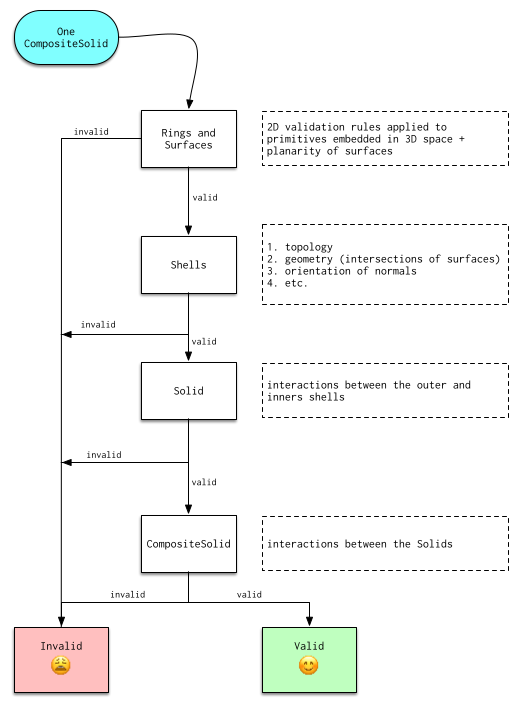
It’s normal: as shown in the figure below, a solid is validated hierarchically, ie first every surface (a polygon embedded in 3D) is validated in 2D (by projecting it to a plane), then every shell is validated, and finally the interactions between the shells are analysed to verify whether the solid is valid. If at one stage there are errors, then the validation stops to avoid “cascading errors”. So if you get the error 203 – NON_PLANAR_POLYGON_DISTANCE_PLANE, then fix it and re-run the validator again. That does mean that you might have to upload your file and get it validated several times—if that becomes too tedious we strongly suggest you to download the code, compile it and run it locally (it’s open-source and free to use).
I’m sure my 3D primitive is valid, but the validator says that something is wrong
It’s possible that there are bugs in val3dity. Please report the issue and provide the following:
the JSON report (use option
--report_json)(a link to) the input file you used
which platform you use, and whether you compiled it yourself or used the web-application
Do you validate the topological relationships between the solids?
If these solids are part of a CompositeSolid then yes, otherwise no.
We do verify whether two BuildingParts forming a Building overlap though.
We however plan to offer in the future this for all primitives/buildings in a file, so that one can verify whether two different buildings overlap for instance.
The IDs for the geometries, shells, and surfaces in the report, are they 0-based or 1-based?
0-based.
Where can I get files containing Solids or CompositeSolid?
www.cityjson.org/datasets/ has many files
in the folder
/data/of the GitHub repository of val3dity there are many examples of files containing different primitives, and in different formats.www.indoorgml.net has a few files